

AI forecasting in Excel
How AI Helps Build Forecast Scenarios in Excel
Scenario forecasting is most useful when each scenario is based on clear business assumptions, not arbitrary percentage changes. ForesightXL helps finance teams use AI assistance to interpret scenario context, apply explained forecast adjustments, and compare different views of the future inside Excel.
Available in Microsoft Marketplace. $19 USD/month. New users get 5 free forecasts.
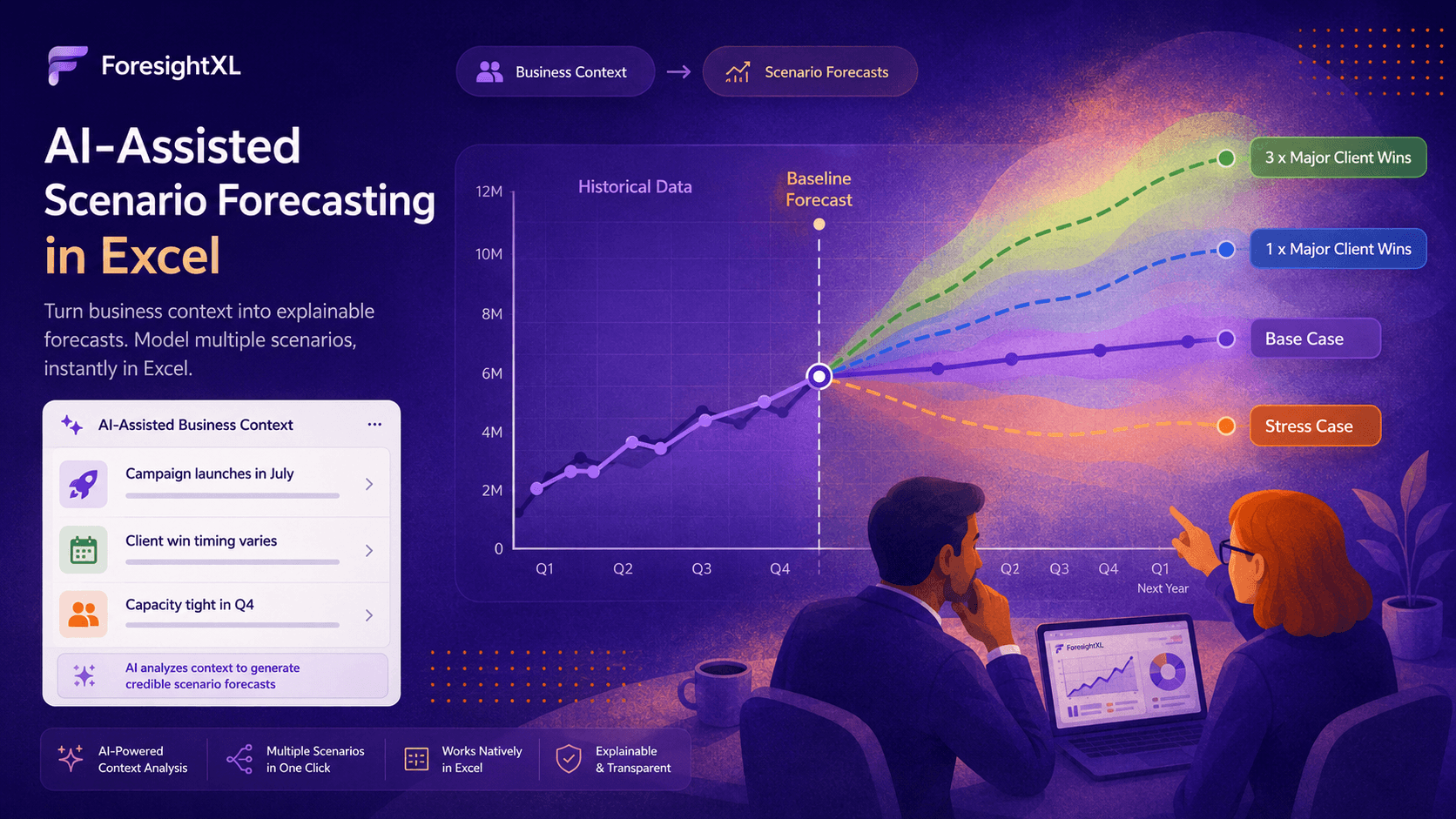
The simple version
ForesightXL starts with your historical data and creates a baseline forecast. You can then describe a scenario in plain English, such as stronger demand, delayed renewals, pricing changes, capacity limits, or a campaign launching earlier than planned. ForesightXL helps translate that context into explained forecast adjustments so each scenario is easier to review and discuss.
How AI-assisted scenario forecasting works
The most useful scenarios are not just high, medium, and low versions of the same number. They are different views of the future based on different assumptions. ForesightXL helps make those assumptions visible.
Step 1
Start with historical data in Excel
Select the time series you want to forecast, such as revenue, costs, volumes, bookings, demand, customer activity, or another measure your team already tracks in Excel.
Step 2
Create a baseline forecast
The baseline forecast shows what the historical data suggests before scenario assumptions are added. It gives the scenario a clear starting point rather than relying on a manual guess. Learn how to choose the right baseline method for your data.
Step 3
Describe the scenario in plain English
Add the scenario context: what changes, when it changes, how large the impact might be, and how certain the assumption is. This could include upside, downside, delay, or stress-case assumptions.
Step 4
Review the explained scenario forecast
ForesightXL applies the business context as forecast adjustments and explains the reasoning. This helps finance teams see what changed, why it changed, and which periods were affected.
Why scenario forecasts need more than a high and low case
A common scenario forecasting shortcut is to take the base forecast and apply a simple percentage change. The upside case becomes plus 10%. The downside case becomes minus 10%. That may be fast, but it often does not explain what would actually need to happen for the scenario to occur. See Five advantages of scenario-based forecasting for a broader view.
A better scenario is assumption-led. It describes the business conditions behind the numbers: which customers convert, which renewals slip, which costs increase, whether demand changes, and whether the business can fulfil the volume implied by the forecast.
Weak scenario
Downside case equals base forecast minus 10%, with no explanation of the operational or commercial reason for the reduction.
Stronger scenario
Downside case assumes two major renewals slip by one quarter, demand softens from September, and capacity limits fulfilment in Q4.
What AI helps with in scenario forecasting
AI assistance is useful because scenario context often starts as business language, not as model logic. ForesightXL helps interpret that context and turn it into adjustments that can be reviewed.
Risks and opportunities
Describe delays, churn risk, new opportunities, customer behaviour, demand shifts, or one-off events.
Timing changes
Explain when a scenario starts, whether the impact is temporary or ongoing, and whether it is phased over several periods.
Operational constraints
Include capacity limits, supply issues, staffing constraints, delivery timing, or fulfilment bottlenecks.
Commercial assumptions
Test pricing changes, campaign activity, pipeline conversion, product launches, renewals, and margin assumptions.
Start with the baseline, then add scenario context
AI should not be used to invent the whole forecast. In ForesightXL, the baseline forecast comes first. That baseline gives the forecast a mathematical starting point based on the historical time series.
Scenario context is then layered on top. This separation is important because it helps teams see the difference between what history suggested and what changed because of the scenario assumptions. See What good forecasting context looks like for examples.
Baseline forecast
What the historical data suggests before scenario assumptions are applied.
Scenario context
Plain-English assumptions about risks, opportunities, timing, demand, pricing, or constraints.
Explained scenario
A revised forecast with visible adjustments and reasoning by period.
Examples of scenario context
The strongest scenarios are specific enough to interpret. They usually explain the affected measure, the timing, the direction, and the reason for the change.
Base case
Pipeline converts broadly as expected, the new campaign launches in July, and renewal timing remains in line with the current plan.
Upside case
Campaign demand arrives one month earlier than expected, two late-stage opportunities close in Q3, and churn remains below the recent run rate.
Downside case
Two renewals are delayed by one quarter, demand softens from September, and pricing changes reduce volume in the final quarter.
Stress case
Pipeline slips, customer churn increases, supplier costs rise, and capacity constraints limit the business from recovering the shortfall quickly.
Use better context to create better scenarios
Scenario quality depends on context quality. A vague assumption such as "sales may be lower" is harder to interpret than a clear assumption such as "two large renewals may slip from September to November". The more specific the context, the easier it is to review whether the scenario forecast makes sense.
ForesightXL also helps users improve the business context behind a forecast by highlighting where additional timing, phasing, scale, ownership, or constraint information would make the forecast more useful.
Why this is useful for finance teams
Scenario forecasting is not only about generating alternative numbers. It is about helping the business understand which assumptions matter most, which risks are material, and what action may be needed.
Faster scenario testing
Change the context and generate a revised scenario without rebuilding the underlying Excel model.
More explainable outputs
Review not only the final scenario forecast, but also the assumptions and adjustments that shaped it.
Better forecast conversations
Discuss whether the assumptions are complete, reasonable, and current instead of debating only the final number.
Related pages
Explore more ForesightXL pages about AI forecasting, business context, and scenario forecasting in Excel.
Frequently Asked Questions
Answers to common questions about using AI assistance for scenario forecasting in Excel.
What is AI scenario forecasting?
AI scenario forecasting uses AI assistance to interpret business assumptions, risks, opportunities, and context, then apply those assumptions to a forecast in a structured and explainable way.
Can AI help create forecast scenarios in Excel?
Yes. ForesightXL helps users start with historical data in Excel, create a baseline forecast, add plain-English scenario context, and review explained adjustments for different scenarios.
How is this different from traditional what-if analysis?
Traditional what-if analysis often changes a small number of model inputs manually. ForesightXL helps users describe the scenario in business language and then review how that context affects the forecast by period.
Should scenarios be based on percentages or assumptions?
Scenarios are usually more useful when they are based on clear business assumptions rather than simple percentage uplifts or reductions. Assumption-led scenarios are easier to review, challenge, and update.
Does ForesightXL replace existing Excel forecast models?
No. ForesightXL is designed to work alongside existing Excel models and finance processes. It helps teams create explainable forecasts and test scenario assumptions quickly using historical data and business context.
Ready to test scenarios inside Excel?
Install ForesightXL Forecast Assistant and generate your first explainable forecast scenario using your own Excel data.
Get started freeCreate explainable scenario forecasts with AI assistance
ForesightXL helps finance teams turn historical numbers and plain-English scenario context into explainable forecasts inside Excel.