

Forecasting in Excel with secure AI assistance
ForesightXL Forecast Assistant is an Excel add-in that helps finance teams create explainable forecasts without leaving Excel.
It starts with maths, building a base forecast from your historical numbers. Then AI helps apply the business context you provide, such as meeting notes, emails, reports, comments, or bullet points.
Each adjustment follows the ForesightXL Framework and includes an explanation, so you can see your base forecast, what changed, why it changed, and how it affected the forecast.
Forecasts take under 60 seconds, so you can test scenarios, update assumptions during a meeting, and generate a revised forecast quickly.
Available now in Microsoft Marketplace. Try 5 forecasts free, then $19 USD/month.
What this Excel forecasting add-in does
ForesightXL Forecast Assistant keeps forecasting inside Excel while adding a consistent, explainable workflow for finance teams that need clarity and speed. As an AI forecast add-in for Excel, it combines historical data and plain-English business context to generate structured, reviewable outputs.
- Generate forecasts directly inside Excel without switching tools.
- Combine historical data with plain-English business context.
- Review a mathematical baseline before applying context adjustments.
- Understand forecast movements through a structured breakdown.
- See explanations linked back to the context you provided.
- Review an executive summary and forecast chart for quick decisions.
- Refine assumptions and rerun forecasts quickly as conditions change.
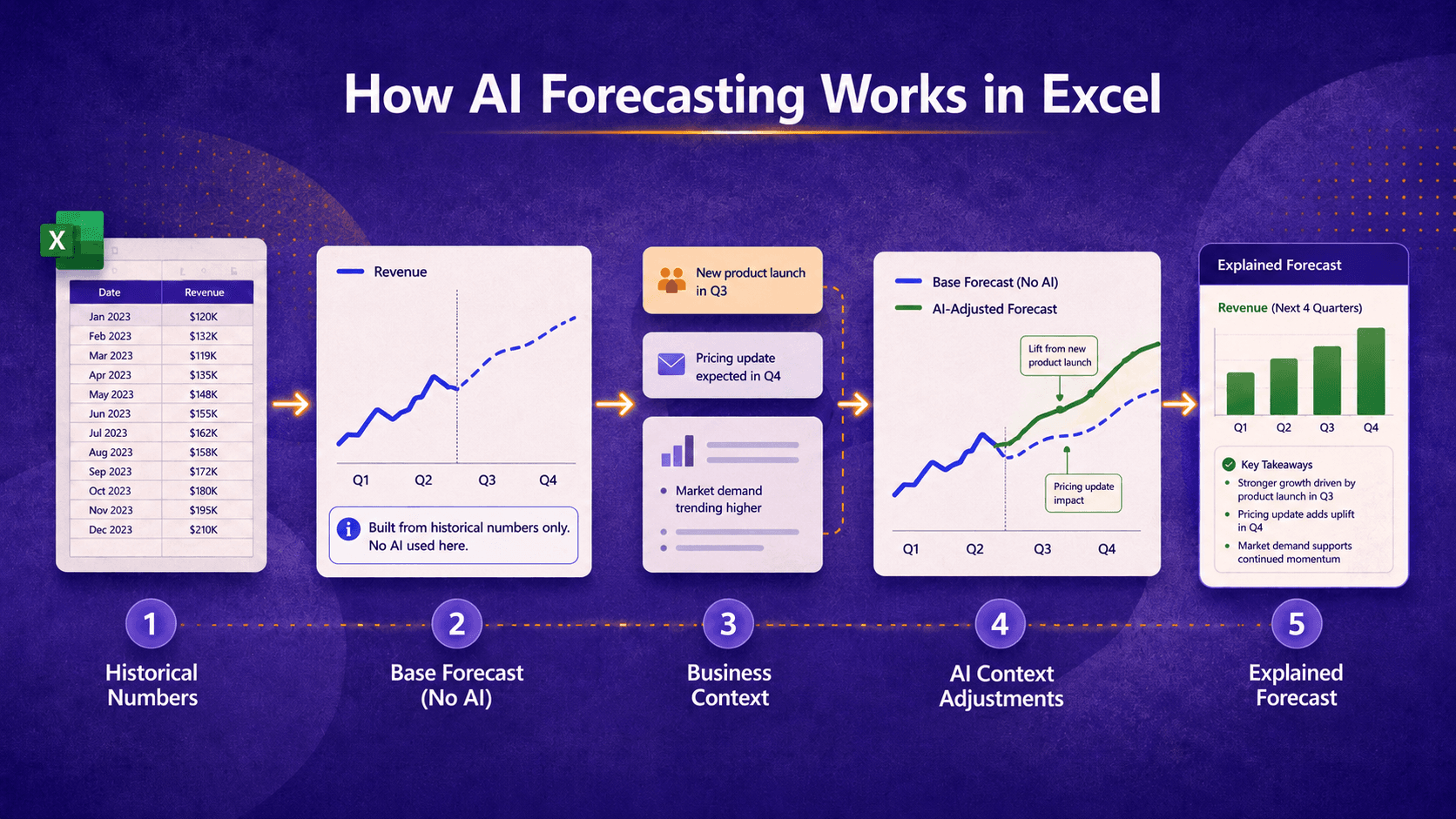
ForesightXL starts with your historical numbers to create a base forecast without AI, then uses AI to apply the business context you provide. Each adjustment is explained so you can see what changed and why.
Why this is different
Most forecasting tools either live outside Excel or deliver black-box numbers. ForesightXL Forecast Assistant keeps your team inside Excel while adding a rigorous, explainable framework that turns assumptions into decisions you can defend.
Built where finance already works
Forecasts are generated inside Excel, so teams keep their models, process, and speed.
Plain-English context with a consistent framework
The Five Factor Forecast Framework turns business context into structured, repeatable inputs.
Explainable output built for decisions
Every movement is broken down and linked back to context, so teams can iterate quickly, compare assumptions, and run scenario forecasting in Excel.
Who it's for
CFOs and finance leaders
Get clear, explainable forecasts to guide strategic decisions.
FP&A teams
Run fast forecast cycles without leaving Excel.
Analysts
Translate assumptions into structured, reviewable outputs.
Business leaders
See the narrative behind forecast movements and scenarios.
Teams that need explainable forecasts inside Excel
Keep models and context in one place for aligned decisions.
AI forecasting resources
Learn how AI-assisted forecasting works, how we handle security, and how business context improves results.
Related use cases
Explore how teams apply ForesightXL across common forecasting scenarios.
Comparisons
Compare AI-assisted forecasting with other approaches.
Frequently Asked Questions
Answers to common questions about installing and using ForesightXL Forecast Assistant in Excel.
Is ForesightXL available now?
Yes. ForesightXL Forecast Assistant is now available in Microsoft Marketplace as an Excel add-in.
You can install it directly into Excel and start using it within your existing workflow, without moving to a separate forecasting platform.
What does ForesightXL do inside Excel?
ForesightXL helps users generate forecasts in Excel by combining historical data with plain-English business context.
Its output includes a mathematical baseline, a structured breakdown of forecast drivers, a forecast chart, and written explanations that help users understand how the result was formed.
Who is ForesightXL designed for?
ForesightXL is designed for finance teams, FP&A professionals, analysts, and business leaders who want faster, clearer, more explainable forecasting inside Excel.
It is especially useful for teams that already work heavily in spreadsheets and want to improve forecast quality without replacing their existing workflow.
Does ForesightXL replace our existing forecasting models?
No. ForesightXL is not intended to replace detailed forecasting models or broader FP&A systems.
It provides a faster, structured way to generate, review, and explain forecast outputs in Excel. In many cases, it complements traditional models by helping teams clarify assumptions, test business context, and improve forecast discussions before updating more detailed models.
Do users need statistical expertise?
No. ForesightXL is designed to make forecasting more accessible while still respecting statistical discipline.
Users do not need deep technical forecasting expertise to get value from the add-in. The system helps structure the process, highlights the role of the baseline, and presents outputs in a clear and consistent format.
Is the output explainable?
Yes. Explainability is a core part of the ForesightXL approach.
Rather than only returning a forecast number, ForesightXL provides structured outputs that help users understand the role of the baseline, the effect of contextual factors, and the reasoning behind the final forecast.
Available now in Microsoft Marketplace
Get started free