

Context-driven forecasting
Turn Business Context into an Explainable Forecast Using AI
The numbers show what has happened. Business context explains what might happen next. ForesightXL uses AI assistance to combine historical numbers with meeting notes, emails, reports, comments, risks, opportunities, and assumptions to create explainable forecasts inside Excel.
Available in Microsoft Marketplace. $19 USD/month. New users get 5 free forecasts.
Forecasts need more than history
Historical numbers are essential, but they do not always know about a new contract, a delayed order, a price increase, a lost customer, a capacity issue, or a one-off spike that is unlikely to repeat. ForesightXL lets users add that context in plain English and see how it affects the forecast.
What counts as business context?
Business context is the information that helps explain what may be different in the future. It can be structured or informal. It can come from a formal report or a short note written during a meeting.
Meeting notes
Forecast review notes, sales updates, leadership commentary, operating reviews, or planning discussions.
Emails and reports
Updates about customers, suppliers, projects, campaigns, market conditions, or internal business changes.
Risks and opportunities
Possible upside, downside, timing risk, delivery risk, churn risk, expansion opportunities, or known constraints.
Simple bullet points
Short plain-English assumptions, such as "pricing increases in July" or "March included a one-off sale".
Examples of context that can affect a forecast
ForesightXL is designed for real finance conversations, where the outlook often changes because the business knows something that is not obvious from the historical numbers alone.
Revenue example
A customer delays an order
"Two major customers are expected to delay orders by one month." ForesightXL can apply this context to the base forecast and explain the timing impact.
Pricing example
A price increase starts from July
"Pricing will increase by 5% from July." ForesightXL can adjust the forecast where the context applies and explain why the forecast changed.
One-off event example
A historical spike should not repeat
"March included a one-off project that is unlikely to recur." ForesightXL can help avoid letting a non-recurring event distort the forecast without explanation.
Capacity example
Growth is limited by staffing or supply
"Sales capacity will be constrained until the new team member starts." ForesightXL can reflect that constraint and explain the effect on the revised forecast.
How ForesightXL applies business context
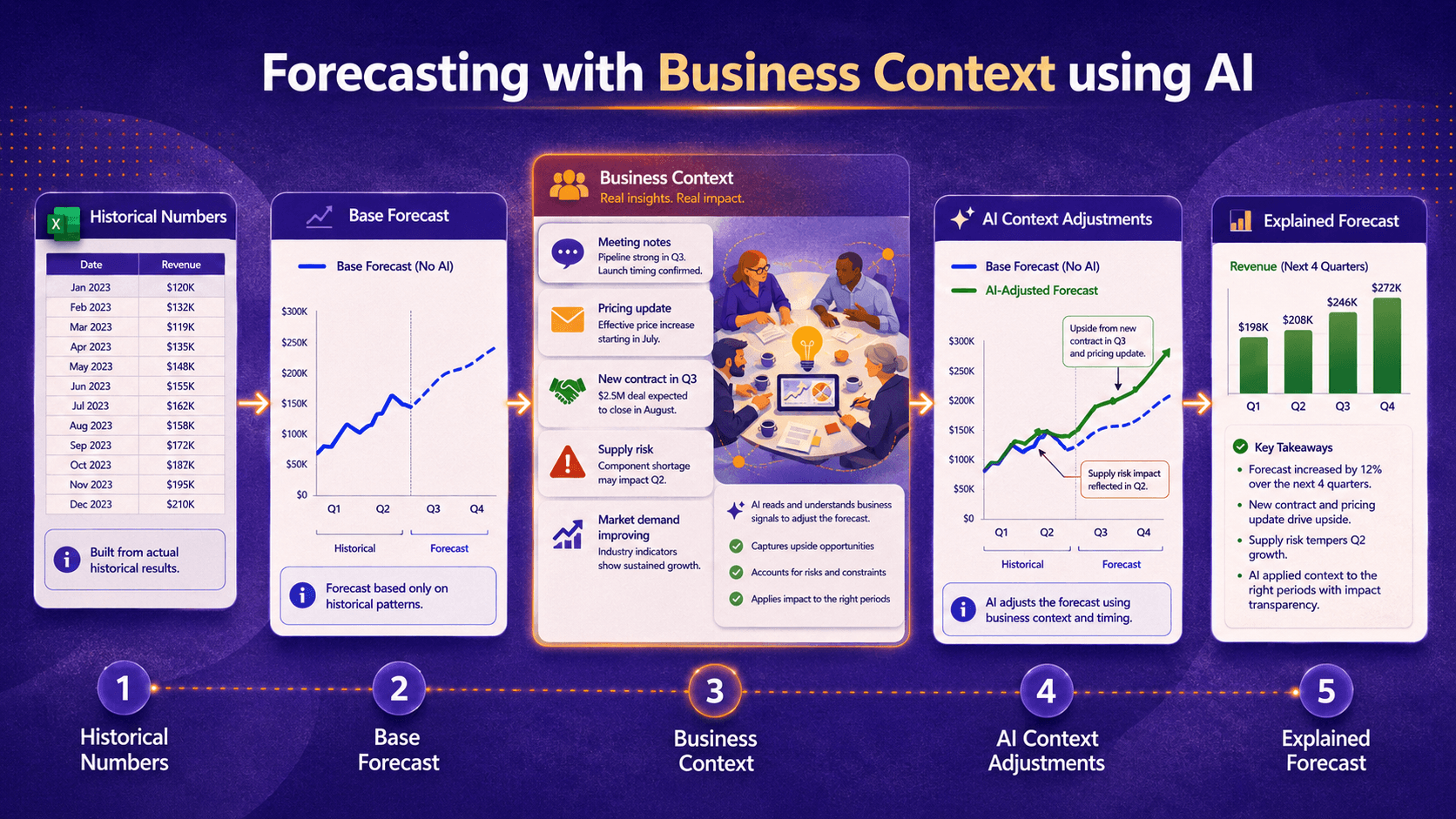
ForesightXL keeps the process simple. The historical data creates the starting point. AI assistance helps interpret the business context and apply explained adjustments. The output shows the result.
Step 1
Create a base forecast from the numbers
ForesightXL uses your historical Excel data to create a base forecast before any extra assumptions are applied.
Step 2
Add the business context
Paste notes, comments, reports, emails, or a bullet point list describing what may affect the forecast. AI assistance helps interpret the context and map it to forecast adjustments.
Step 3
Generate the explained forecast
ForesightXL shows your base forecast, applies AI-assisted context adjustments, and explains what changed and why.
Why this helps finance and business teams work together
Forecasting often breaks down when finance owns the numbers and the business owns the context. ForesightXL helps bring both together earlier, so teams can discuss the drivers of the forecast before updating detailed models, reports, or planning packs.
Finance can start from the data
The base forecast gives the discussion a clear numerical starting point.
The business can add what it knows
Teams can capture risks, opportunities, timing changes, and known events in plain English.
Everyone can see the change
The adjustment explanations help teams understand why the forecast moved.
Scenarios can be tested quickly
Update the context and generate another forecast when the conversation changes.
Common forecasting situations where context matters
Context-driven forecasting is useful when the future is likely to differ from the past for a known business reason.
Revenue forecasting
Pricing, renewals, churn, pipeline timing, new customers, lost customers, or campaign effects.
Demand forecasting
Seasonality, promotions, supply limits, customer behaviour, capacity changes, or market shifts.
Rolling forecast updates
Actuals are changing, assumptions have moved, or the latest business commentary needs to be included.
Scenario planning
Teams need to compare base case, upside, downside, timing changes, or operational constraints.
Related pages
Explore more ways ForesightXL helps finance teams create explainable forecasts in Excel.
Frequently Asked Questions
Answers to common questions about forecasting with business context.
What is business context in forecasting?
Business context is the information behind the numbers that may affect the future, such as pricing changes, lost customers, new contracts, delayed orders, promotions, capacity limits, risks, opportunities, or one-off events.
Can ForesightXL use meeting notes in a forecast?
Yes. You can provide meeting notes, emails, reports, comments, or bullet points as context for ForesightXL to consider when generating an explainable forecast.
Why is historical data not always enough?
Historical data shows what has happened. Business context helps explain what may be different in the future, such as a price change, a new customer, a supply constraint, or a one-off event that should not repeat.
How does ForesightXL apply business context?
ForesightXL creates a base forecast from historical numbers, then uses AI assistance to apply the business context you provide. Each adjustment is explained so you can see what changed and why.
Ready to forecast with business context?
Install ForesightXL Forecast Assistant and generate your first explainable forecast using your own Excel data and plain-English context.
Get started freeTurn context into an explainable Excel forecast using AI
ForesightXL helps finance teams combine the numbers in Excel with the business context behind the forecast, so teams can review the base forecast, the adjustments, and the explanation for each change.