

AI forecasting in Excel
How AI Forecasting Works in Excel
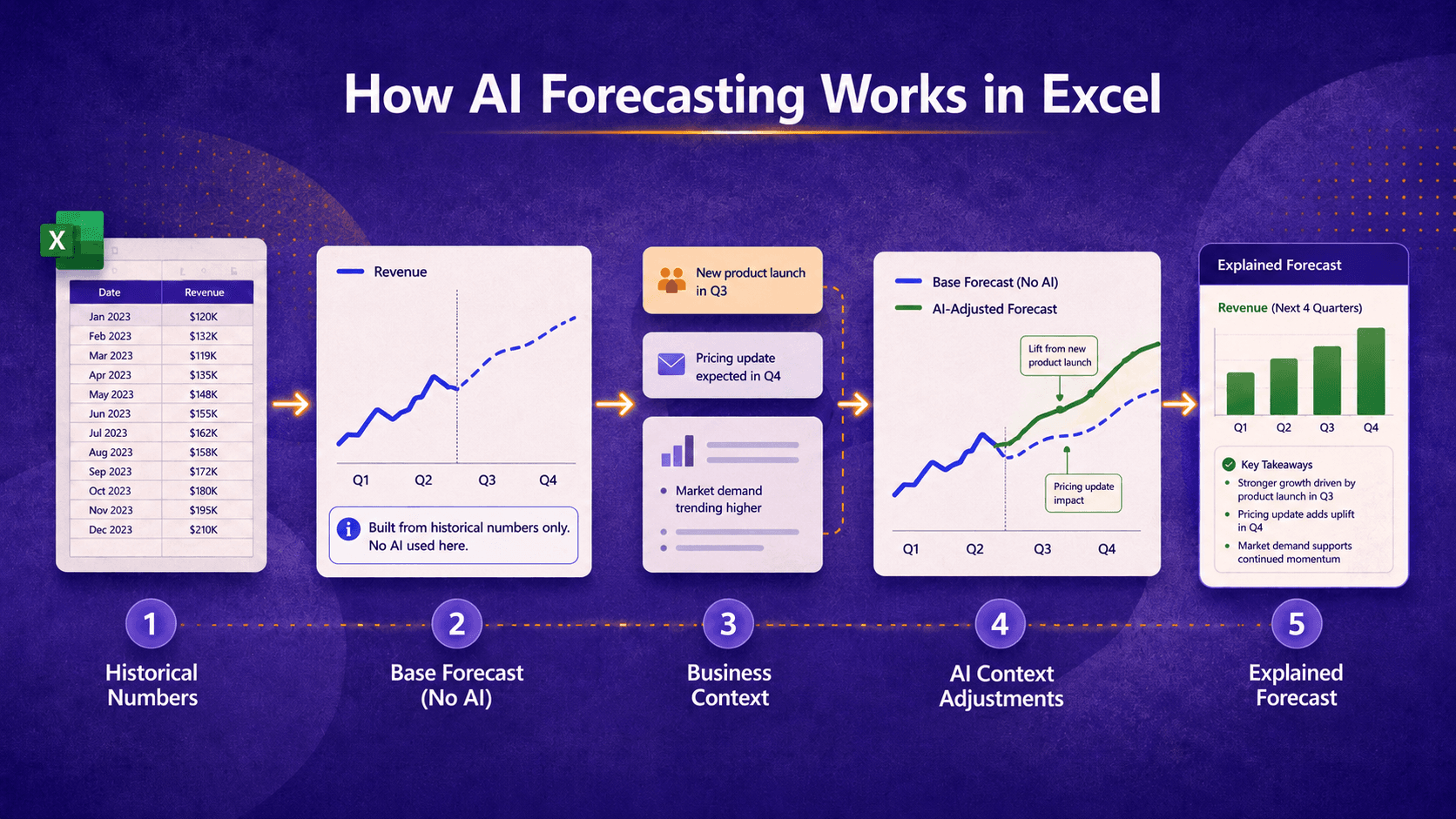
AI forecasting does not need to mean handing the forecast to a black box. ForesightXL starts with your historical numbers, creates a base forecast, then uses AI to help apply the business context you provide. Each change is explained so finance teams can see what changed, why it changed, and how it affected the forecast.
Available in Microsoft Marketplace. $19 USD/month. New users get 5 free forecasts.
The simple version
ForesightXL uses maths to create a base forecast from your historical numbers. AI then helps apply the business context you provide, such as meeting notes, emails, reports, comments, or bullet points. The result is a forecast you can review, explain, and update quickly inside Excel.
How ForesightXL uses AI in the forecast process
The workflow is designed to be clear for finance teams. The numbers create the starting point. The business context helps explain what may be different in the future.
Step 1
Start with your historical numbers
Select the time series you want to forecast, such as revenue, costs, volumes, customer activity, or another measure your team already tracks in Excel.
Step 2
Create a base forecast
ForesightXL uses the historical numbers to build a base forecast. This gives the forecast a clear starting point before any extra business context is applied.
Step 3
Add business context in plain English
Add what the numbers alone may not show. This could include pricing changes, expected customer churn, delayed orders, new contracts, capacity limits, campaigns, risks, opportunities, or one-off events.
Step 4
Review the explained forecast
ForesightXL shows your base forecast, applies the context you provide, and explains what changed and why. This makes it easier to review the forecast with finance, business leaders, and other stakeholders.
Why the base forecast matters
A base forecast gives teams a clear starting point. It helps separate what the historical numbers suggest from what business context may change. That separation is important because finance teams need to explain the forecast, not just produce it.
The numbers stay visible
Users can see the starting forecast before assumptions and context are applied.
Context is separated
Business assumptions are applied as changes to the base forecast, rather than being hidden inside the final number.
The forecast is easier to discuss
Teams can focus on what changed, why it changed, and whether the adjustment makes sense.
What AI helps with
AI helps interpret the words and assumptions you provide. It can help turn the business conversation into forecast adjustments, while ForesightXL keeps the output structured and explained.
Meeting notes
Use notes from forecast reviews, sales meetings, leadership discussions, or operating updates.
Emails and reports
Add commentary from reports, updates, market notes, or internal emails that affect the outlook.
Simple bullet points
Write short assumptions such as "price increase from July" or "customer order delayed by one month".
Scenario descriptions
Describe a base case, upside case, downside case, or alternative assumption set.
Why this is different from asking AI to guess a number
A finance forecast needs structure, review, and explanation. ForesightXL is designed to help teams create a forecast from historical data and business context while keeping the main movements visible.
Clear starting point
The base forecast is created from your historical numbers.
Clear adjustments
Business context is applied as explained changes to the forecast.
Clear discussion
Teams can review, challenge, and update the assumptions behind the result.
Related pages
Explore more ways finance teams can use ForesightXL for explainable forecasting in Excel.
Frequently Asked Questions
Answers to common questions about how AI-assisted forecasting works in ForesightXL.
How does AI forecasting work in Excel?
ForesightXL starts with historical numbers in Excel and creates a base forecast. AI then helps apply the business context you provide, such as meeting notes, comments, reports, or bullet points. Each adjustment is explained so you can see what changed and why.
Does AI create the whole forecast?
No. ForesightXL first builds a base forecast from your historical numbers. AI helps apply your business context to that base forecast and explain the changes.
What context can I provide?
You can provide meeting notes, emails, reports, comments, risks, opportunities, pricing changes, customer changes, one-off events, or a simple bullet point list.
Can I test more than one scenario?
Yes. You can change the business context and generate another forecast, making it easier to compare different assumptions and scenarios.
Ready to forecast inside Excel?
Install ForesightXL Forecast Assistant and generate your first explainable forecast using your own Excel data.
Get started freeCreate explainable forecasts with AI assistance
ForesightXL helps finance teams turn historical numbers and plain-English business context into explainable forecasts inside Excel.