

Scenario forecasting in Excel
Scenario Forecasting in Excel with AI
ForesightXL helps finance teams test different forecast scenarios without rebuilding a model from scratch. Start with historical numbers, create a base forecast, then use AI to apply plain-English scenario context such as upside, downside, pricing changes, demand shifts, capacity limits, customer changes, or market risks. For a deeper walkthrough, see AI forecasting scenarios in Excel.
Available in Microsoft Marketplace. $19 USD/month. New users get 5 free forecasts.
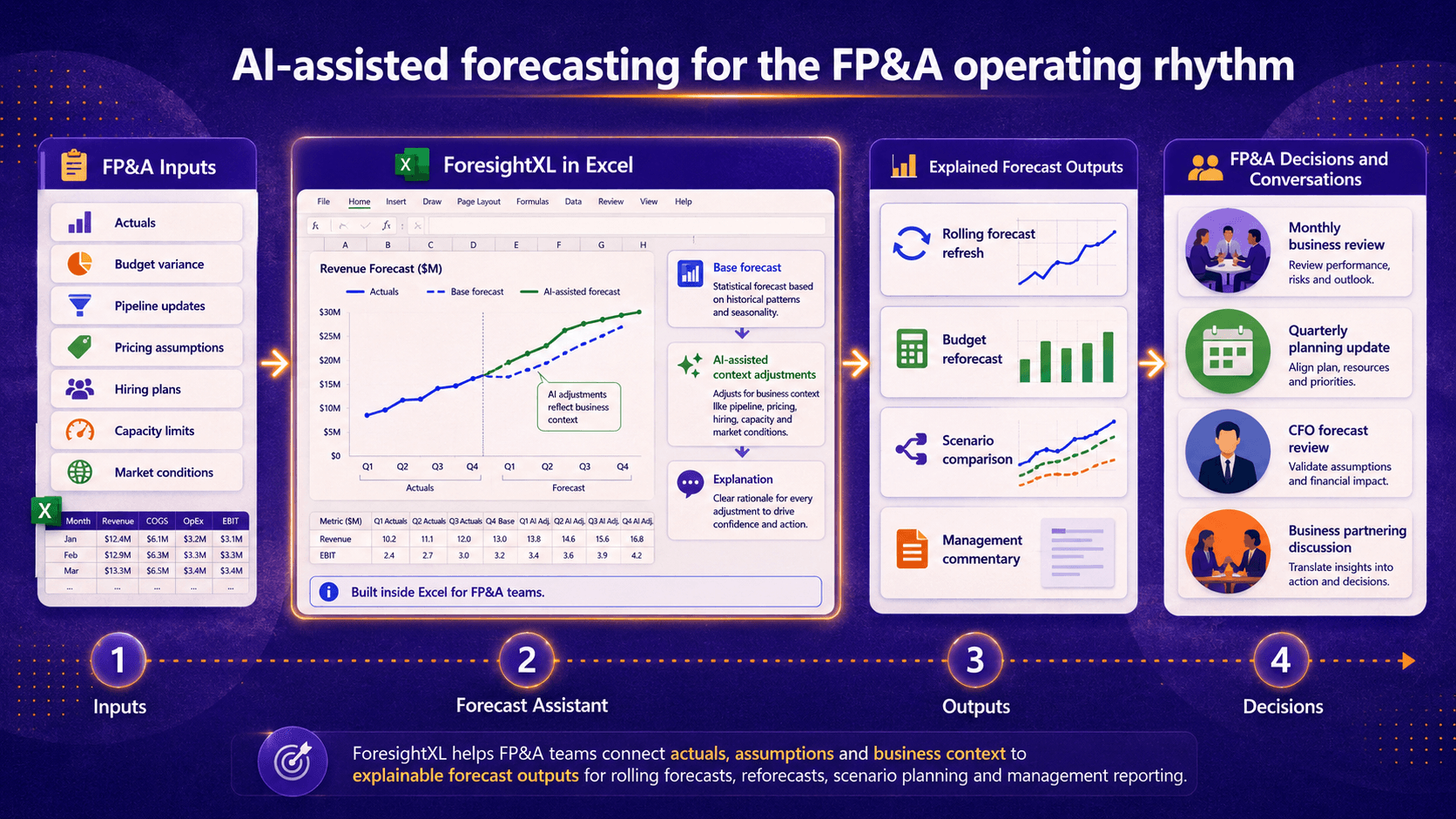
ForesightXL supports scenario forecasting by connecting actuals, assumptions and business context to explainable outputs for scenario comparisons, rolling forecasts, reforecasts and management reporting.
What is AI scenario forecasting in Excel?
AI scenario forecasting in Excel helps finance teams compare different versions of the future from the spreadsheet they already use.
ForesightXL starts with historical numbers to create a base forecast. You can then describe a scenario in plain English, such as stronger demand, delayed pipeline, price changes, customer churn, capacity limits or market risk.
AI helps apply that scenario context to the base forecast, with an explanation for each change, so teams can compare the base case, upside case and downside case more clearly.
Available in Microsoft Marketplace
Install the ForesightXL Forecast Assistant add-in directly from Microsoft Marketplace and start running scenario forecasts inside Excel.
Test forecast scenarios without duplicating your model
Scenario planning is useful when finance teams need to compare possible outcomes, but it can become slow and fragile when every case requires copied spreadsheets, hard-coded overrides, and manual commentary. ForesightXL gives teams a faster way to test forecast assumptions while keeping the work inside Excel.
Keep the baseline visible
Start from historical data and review the mathematical baseline before interpreting the scenario impact.
Change assumptions in plain English
Describe the scenario using business language: delayed pipeline, higher churn, lower demand, capacity constraints, pricing changes, or new initiatives.
Generate explainable outputs
Review the forecast chart, executive summary, forecast table, and component breakdown to understand why the scenario changed the outlook.
Compare cases faster
Rerun the forecast with different assumptions to compare base, upside, downside, and management cases.
How to run scenario forecasts in Excel with ForesightXL
ForesightXL gives finance teams a repeatable way to turn scenario assumptions into explainable forecast outputs inside Excel.
Step 1
Start with historical data
Use the time-series data your team already tracks in Excel, such as revenue, demand, costs, customers, usage, volume, or other forecast measures.
Step 2
Describe the scenario
Add plain-English context for the case you want to test. For example: demand softens for two quarters, a major customer renewal is delayed, a price increase begins in July, or capacity limits constrain growth.
Step 3
Generate the scenario forecast
ForesightXL combines the baseline with the business context you provide and generates a structured forecast output inside your workbook.
Step 4
Review and rerun alternative cases
Review the explanation, adjust the assumptions, and rerun the forecast to compare different cases for planning, reporting, or leadership discussion.
Scenario assumptions you can test
Use ForesightXL when the forecast depends on business assumptions that are difficult to capture with a simple formula or single spreadsheet input.
Base, upside, and downside cases
Compare management's expected case against more optimistic or conservative assumptions.
Pricing and margin changes
Test the effect of price increases, discounting, promotions, packaging changes, or margin-protection initiatives.
Demand shifts
Model stronger demand, weaker demand, changing customer behaviour, seasonal variation, or macroeconomic pressure.
Pipeline and customer timing
Reflect delayed deals, faster conversions, renewal timing, customer churn, major wins, or large customer losses.
Capacity constraints
Test how supply limits, staffing, production capacity, inventory, or fulfilment constraints may affect future results.
Strategic initiatives
Include product launches, new markets, channel changes, sales hiring, retention initiatives, or operating improvements.
Forecasting with Business Context using AI
Scenario forecasting is most useful when teams can quickly change the business story behind the numbers. A base case, upside case or downside case may depend on different assumptions about demand, pricing, capacity, customer behaviour, timing or market conditions.
ForesightXL starts with a base forecast, then uses AI to apply the scenario context you provide. Each change is explained, making it easier to compare scenarios, challenge assumptions and agree which version of the forecast is most useful for the decision being made.
What you get back from a scenario forecast
ForesightXL is designed to return scenario outputs that can be reviewed by finance teams and explained to stakeholders. Each run helps connect the scenario assumptions to the resulting forecast.
Scenario forecast table
Period-by-period forecast values that can be reviewed alongside your existing Excel analysis.
Actuals vs scenario chart
A visual comparison of historical actuals and the scenario forecast so teams can quickly inspect the change in outlook.
Executive summary
A plain-English explanation of the scenario result and the main factors influencing the forecast.
Component breakdown
A structured view of the baseline and contextual factors that shaped the final scenario forecast.
Common scenario forecasting use cases
Scenario forecasting is useful whenever teams need to explain how different assumptions could change the outlook.
Revenue scenario forecasting
Compare revenue outcomes under different pipeline, pricing, churn, demand, or market assumptions.
FP&A reforecasting
Update the outlook quickly when actuals diverge from plan or business conditions change.
Demand and capacity planning
Test how demand changes or capacity constraints may affect future performance.
Leadership and board reporting
Explain the likely range of outcomes and the assumptions behind each scenario.
Why use ForesightXL for what-if forecasting in Excel?
Traditional what-if analysis usually depends on predefined model inputs. ForesightXL helps teams test broader business scenarios by combining historical data with contextual assumptions and explainable forecast outputs.
Business-context driven
Describe scenarios using the language of the business, not only spreadsheet input cells.
Explainable by design
Review the reasoning behind each scenario forecast before using it in a decision.
Built inside Excel
Keep forecast scenarios close to the data, models, and reporting workflows your finance team already uses.
Looking for revenue-specific examples? See revenue forecasting in Excel with AI.
Who uses AI scenario forecasting in Excel?
CFOs and finance leaders
Understand the strategic implications of different outcomes before committing to a plan.
FP&A teams
Run faster scenario analysis during budget cycles, rolling forecasts, and monthly business reviews.
Finance analysts
Translate business assumptions into reviewable forecast outputs without rebuilding every case manually.
Business leaders
Compare forecast narratives and align on the assumptions that matter most.
Related use cases
Explore related forecasting workflows that pair well with scenario planning.
Comparisons
Compare ForesightXL with other forecasting approaches.
Frequently Asked Questions
Answers to common questions about running scenario forecasts and what-if analysis in Excel with ForesightXL.
What is scenario forecasting in Excel with AI?
Scenario forecasting in Excel with AI helps finance teams test different possible futures by changing business assumptions and generating explainable forecasts inside Microsoft Excel. ForesightXL lets users compare base case, upside, downside, and other scenario assumptions while keeping the workflow in Excel.
Can I run what-if scenarios in Excel with ForesightXL?
Yes. You can update the business context and regenerate the forecast to test what-if scenarios such as delayed sales, higher churn, lower demand, price increases, capacity constraints, or new strategic initiatives.
How is this different from Excel What-If Analysis?
Excel What-If Analysis usually changes numerical inputs in a predefined model. ForesightXL helps users describe broader business context in plain English and generate a structured, explainable forecast output that reflects those assumptions.
Can I compare base case, upside, and downside scenarios?
Yes. Teams can run separate forecasts with different context assumptions to compare base case, upside case, downside case, management case, or other planning views.
What assumptions can I test in a scenario forecast?
You can test assumptions such as demand changes, pricing decisions, churn risk, pipeline delays, major customer wins or losses, capacity constraints, product launches, market conditions, and one-off events.
Does ForesightXL replace detailed scenario models?
No. ForesightXL complements existing Excel workflows by helping teams generate, explain, and compare scenario forecasts quickly. Detailed operating models and planning systems remain under finance control.
How do I start scenario forecasting with ForesightXL?
Install ForesightXL Forecast Assistant from Microsoft Marketplace, open Excel, use your historical data, describe the scenario context, and generate your first forecast. New users get 5 free forecasts.
Ready to run scenario forecasts inside Excel?
Install ForesightXL Forecast Assistant and generate explainable scenario forecasts using your own Excel data and business assumptions.
Get started freeRun explainable scenario forecasts in Excel
Test base case, upside, downside, pricing, demand, capacity, and market assumptions using historical data and plain-English business context. Keep the workflow in Excel and generate outputs your team can review, discuss, and refine.